Game Scout: Measuring SEO Traffic Quality with Umami
Why I Started Checking Umami
I was trying Google Analytics and Vercel Analytics. Vercel Analytics is okay for basic use, but when I wanted to do more, I needed to pay more, especially for events and similar things. For Google Analytics, I needed a strict consent banner. So I started to look for an analytics option that is open source and also privacy-friendly. That is how I found Umami.
What I Wanted to Measure
Basically what I want to see is whether my features are working. For example, I created a compare button to compare games, but it never got any attention from anyone. Also, I see a lot of views in Google Search Console or Vercel Analytics, but it is hard to understand the difference between bots and real visitors. Is there a real person checking the app? It was hard to answer without events. So I added basic events. For example, if a user clicks the detail page, or if they click the video tab, I can track that more clearly.
What Pages I Looked At
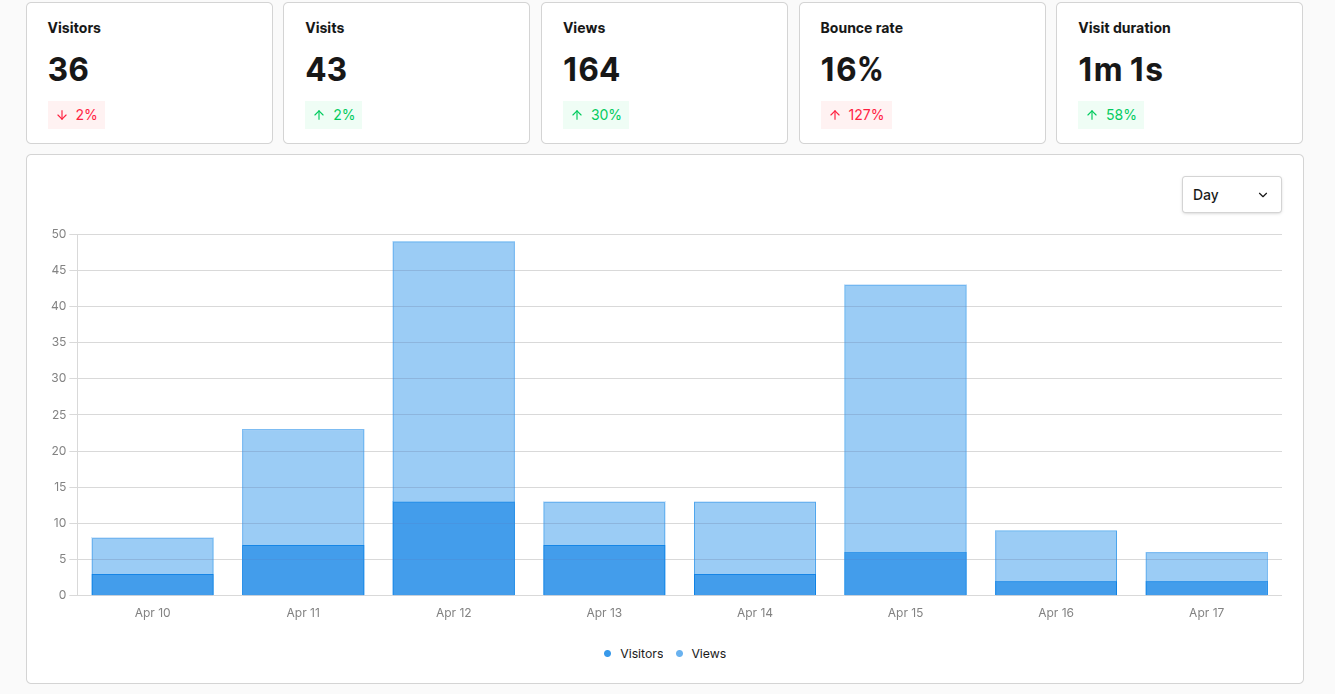
Umami has a really nice overview on the home page, but the events and sessions pages are also useful. Because I do not have a lot of sessions right now, it is actually easy to check them one by one, see how much time users spend, and which events they trigger. It is helping me understand which features are working.
What Looked Better Than Expected
It was easy to set up. I was surprised to see how important ranking is. From the sessions I got, I can clearly see that the first 2-3 games get most of the attention. Users check the detail pages for them.
What Looked Weak
In general, I do not have many real users yet. Most of the visitors are bots. It is better to understand first how to create value for users.
What I Think This Means
I need more real users to understand whether what I provide makes sense for them.
What I Want to Change Next
I would like to understand better what is important for users.